GPS Art
RouteDoodle is a free app for GPS Art, where you draw a shape by biking or running. It's also called Strava Art or drawing with your feet.
Your art has to be one unbroken line: a GPS trace is a single line from the moment you press start to the moment you press stop.
Following roads, connecting dots, or roaming free
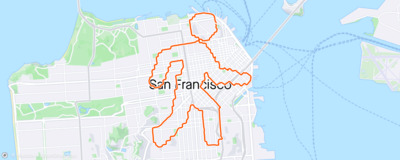
Road-map art
In this kind of GPS art, every line is a road or path you actually travel along. It's the most constrained kind — the challenge is designing art that looks good and fits the streets.
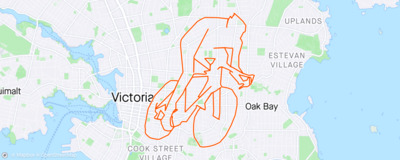
Pause-plot art
Here the art is connect-the-dots. You pause the recording, travel to the next point, resume for a moment, and pause again — so the trace joins the points with straight lines, wherever the roads go.
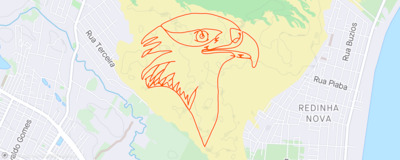
Freehand art
Here you leave the roads behind and draw across open terrain — a grassy field, a desert, even a lake. A blank canvas, with nothing to constrain the line.
Road-map art is the hardest kind to design. Your art has to fit real streets. That's what RouteDoodle is great at: you draw, it finds the roads.
How to make your own
Start from an image, or draw your own. RouteDoodle finds a spot where it fits the roads, and turns your line into a route to bike or run.
 1 Start
Search for an image, use your own, have AI make one, or draw it with the Pencil.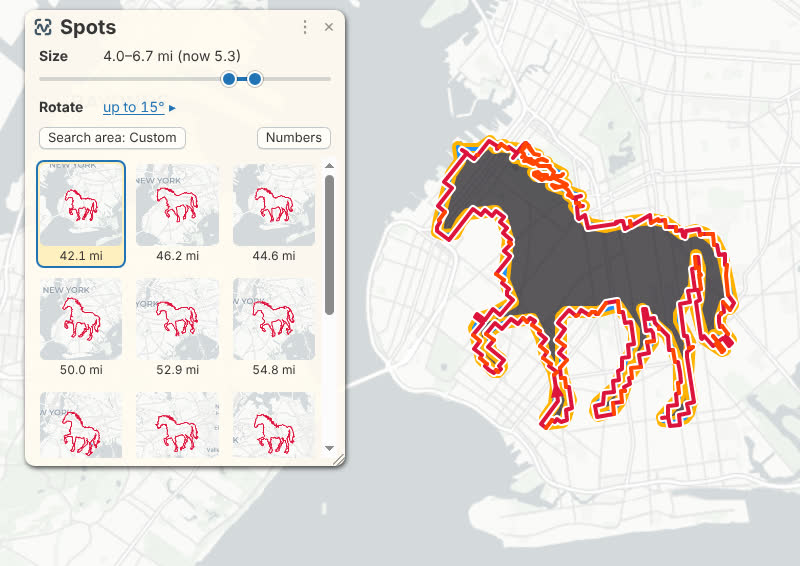 2 Find a Spot
It lands where the roads fit it best, with other spots to try. Or move it around yourself.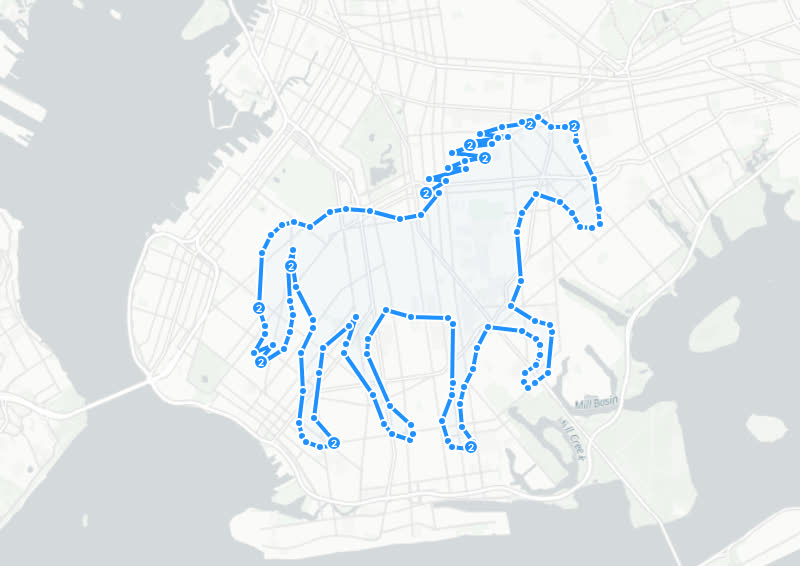 3 Fine-tune
Nudge the blue line's points until it looks just right.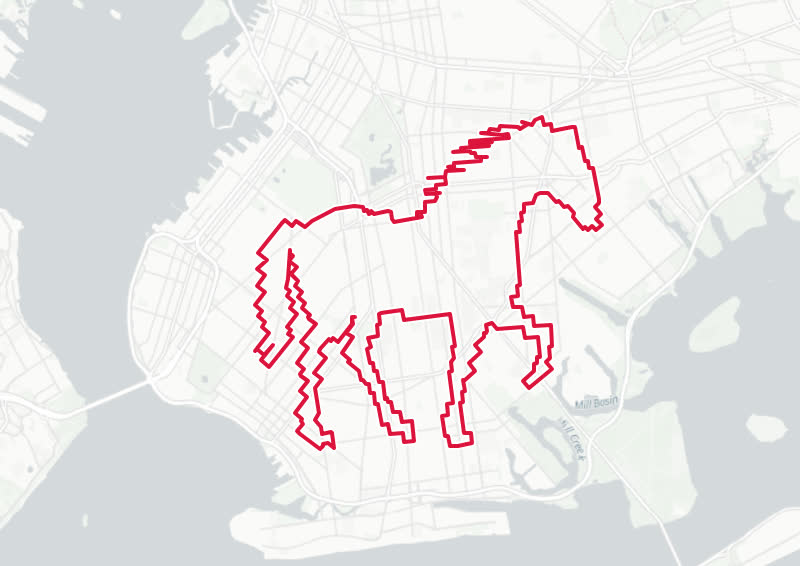 4 Head Out
Take the red Route with you, on a bike or on foot.
New here? Take the tutorial — it walks you through your first doodle, one step at a time, right on the map. Or pick one of the other tutorials.
Learn more with the tutorials: .
Start your doodle
Every doodle starts as a blue Drawing. RouteDoodle traces it from an image, or you draw it yourself. As soon as there is a Drawing, RouteDoodle makes a red Route along real roads. There are four ways to start:
Search for an image
Type what you'd like to draw. Image Search looks for bold, simple images first, the kind that trace well.
Use your own image
Drag an image onto the map from another window or from your computer, or paste an image, or its web address, onto the map.Copy an image's web address, then paste it into Image Search and search for it.
Have AI make one
Describe what you'd like in a few words, and AI makes a simple image for you to trace.
 Draw it yourself
Turn on the Pencil and draw right on the map. A stroke that starts at the end of your line carries it on.
Try the Pencil Heart
 Circle
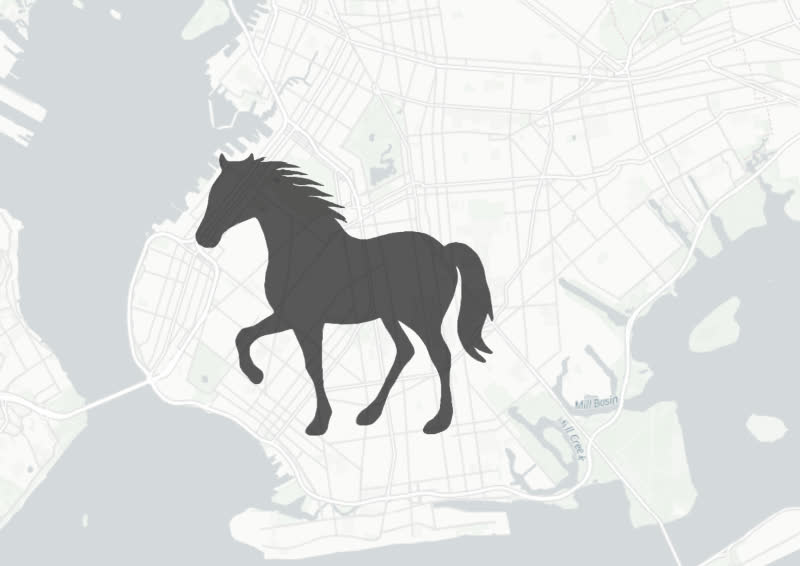
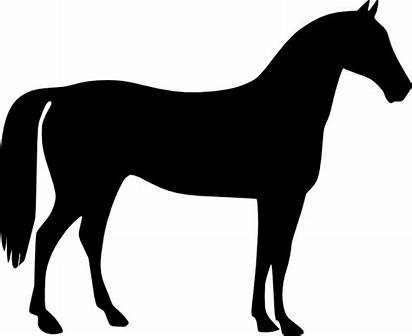 Horse
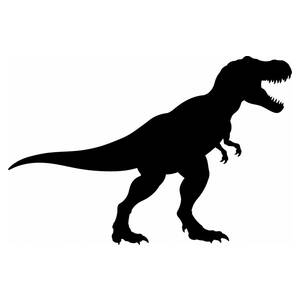 Dinosaur
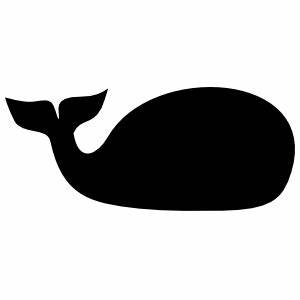 Whale
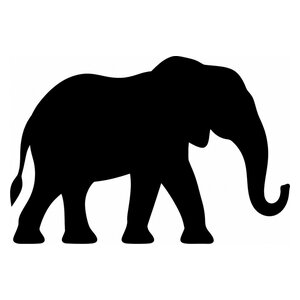 Elephant
Once your doodle is on the map, RouteDoodle looks for good spots for it.
Which images trace well
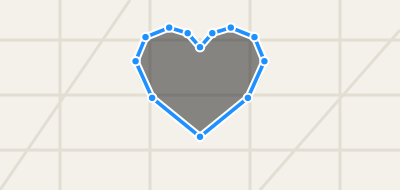 Traces well
One dark shape on a plain background traces into one clean line.
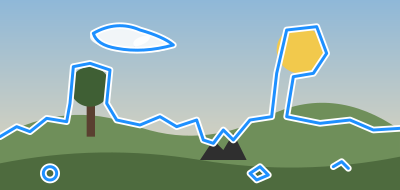 Traces badly
Backgrounds, shading, and small details turn into jagged, stray lines that are hard to follow.
Good to know
- When there's a doodle already
A new image goes in the middle of the map. If that's on top of part of your doodle, the image takes the place of the lines there. If it's beside your doodle, the image joins it as more lines. If you've moved the map away from your doodle, the image takes its place, so you can start a new one anywhere. To have a new image always replace your doodle, always join it, or replace only the part it covers, change A new image in the settings. - Outlines and inside lines
Most images (PNG, JPEG) are traced around their outline. An image saved as SVG keeps its own lines, inside ones too.
F or ' opens Image Search. P turns the Pencil on and off. Q shows or hides the image.
Find a spot
Where your doodle sits on the map decides which roads the Route can follow. A shape that's a tangle in one place can come out clean a few blocks away, a little bigger, or rotated a little. So try it in a few places. RouteDoodle can do the looking for you, or you can hunt around yourself.
 Let RouteDoodle look
Press Suggest Spots.Open the Spots tab at the bottom of the screen.Open the Spots tab at the right edge of the screen. RouteDoodle tries your doodle all over the part of the map you can see, a little bigger or smaller and rotated a little, and shows the spots where it follows the roads best, best first.
RouteDoodle opens this automatically unless you've turned off the setting.
Move it yourself
The Route follows your doodle instantly as you drag it, so you can sweep it across a whole neighborhood and see at a glance where the roads fall into place.
- Move: drag the hand above your doodle, or right-drag or Alt/Option-drag anywhere inside it. A one-finger drag on your doodle moves it too; if it moves when you meant to move the map, turn off One-finger drag moves the doodle in the settings.
- Resize: drag a corner.
- Rotate: drag the round handle at the top.
- Flip: drag a corner past the opposite side, to mirror it.
In the Spots window
- Pick a spot to move your doodle there, or step through them with ← →. Under each is how long its Route is. Scroll down for more. Undo puts your doodle back where it was.
- Size and Rotate, at the top, say how much bigger or smaller it may make your doodle, and how far it may rotate it. Set Rotate to any angle to try every direction; that takes longer. It never changes your doodle's shape.
- Search area is the part of the map it looks over: Auto, the part you can see, or Custom, an outline of your own. To look somewhere else, move the map there.
- Numbers shows the spots as a list, with how closely each Route follows your drawing (Match) and how much of it is on pleasant roads (Comfort). See Route Stats for more about each.
Tips
- Make it big. Zoom out and stretch your doodle, so there are streets enough for its details. The Route's length updates as you go, so stop at a distance you're happy to bike or run.
- Zoom out before you search to give Suggest Spots more of the map to look over.
- To have a new image land in the middle of the map instead, press Skip while it looks, or turn off Suggest Spots for a new image in the settings.
- To keep the Spots window shut when you turn off the pencil, or have it open only for bigger drawings, move Suggest Spots after penciling in the settings.
Why a point sometimes moves a little
Suggest Spots may move a point a little, onto the intersection the Route goes through, so that the Route doesn't go up a side street and back, or along the wrong street for a block. The rest of your doodle keeps its shape.
S opens and closes the Spots window.
Fine-tune your doodle
The Drawing is the blue line, made of points joined like a connect-the-dots puzzle. The Route is the red line RouteDoodle makes from it along real roads and paths, the line you'll ride or run. Moving a drawing point moves the route point with it. Once your doodle is in a good spot, nudge points until it looks right.
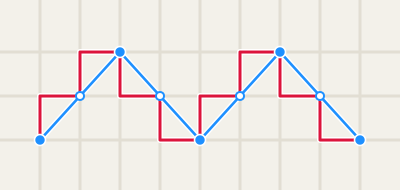
One point at a time
- Move a point: drag a solid blue point on the Drawing, or the red point that goes with it on the Route.
- Add a point: drag one of the hollow markers between two points.
- Remove a point: clicktap it and press Backspace or clicktap
 Remove. The line stays joined through the points on either side.
- Rub out part of a line: turn on the
 Eraser and drag across the line, or clicktap it. The line is cut where the eraser's edge crossed it, and what's left stays where it was. Rubbing through the middle of a line leaves two lines. To erase finely, zoom in.
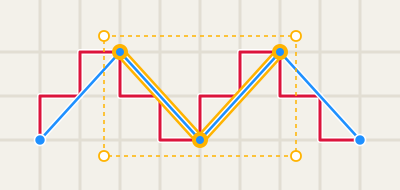
Several at once
- Select: Shift-drag on the map to draw a lasso around them. Shift-click selects a run of points, and Control-click adds one at a time.Touch the map, hold still for a moment, then drag, to draw a lasso around them.
- Move, resize, or rotate them: drag the amber box around them, or its handles. With every point selected, the image goes along.
- Reverse them: clicktap
 Reverse.
Loops
A line can be a loop or not. To close a line into a loop, drag its start onto its end, or its end onto its start. To open a loop back up, clicktap the point where you want the gap and clicktap  Split.
Working in pieces
While you work, a doodle can be in several separate lines, so that you can change one part without the rest. Dropping an image with several parts makes one line per part.
- Cut a line in two: clicktap a point and clicktap Split. With two neighboring points selected, the line is cut between them; with a stretch of points selected, that stretch is cut out.
- Move one line: each line gets a dotted box of its own. Drag its hand, or right-drag inside it, to move just that line, and its corner and rotation handles to resize and rotate it. The outer box still moves the whole doodle.
- Join two lines: drag an end of one onto an end of the other, or draw with the Pencil from one end to the other. If the ends point the wrong way, one line is turned around so that they meet.
A faint dotted line shows each gap between lines. It isn't something you can follow, so join the lines before you're done: the doodle you head out with is one line. While there's more than one, the top of the map says how many, and its Next gap takes you to each gap in turn. Try it: Working in pieces
Where a Pencil stroke attaches
A stroke that starts or finishes near the end of a line attaches to it there. Begin well away from your lines, and finish away from their ends, to start a separate line. While the Pencil is on, a dashed line from the pointer shows where a stroke would attach. Right after you clicktap a single point, the next stroke always attaches, so you can clicktap from point to point however far apart they are.
How far away is far enough is up to you, with Pencil strokes away from the doodle in the settings: from every stroke attaching, to only strokes that start right on a line attaching. Try it: Drawing with the Pencil
W shows or hides the Drawing. P turns the Pencil on and off, and O the Eraser. ControlZ undoes, and ControlY redoes.
Head out
The Route is the red line you follow, on a bike or on foot. It's what your GPS will record, and the art your Strava followers will see. RouteDoodle makes it from your Drawing, along real roads and paths, and keeps it up to date as you change your doodle.
See it the way Strava will: hold down Spacetouch and hold the  button, and only the Route shows. Let go to get back to your doodle.
Bike, run, or fly
 Bike Mode
For riding. Bike lanes and bike paths come first, then quiet streets. Busy roads, rough surfaces, footpaths, and stairs are avoided.
 Run Mode
For running. Sidewalks and footpaths come first, and one-way streets go both ways. Busy roads with no sidewalk are avoided.
 Bird Mode
A straight line, shown dashed, for where the map shows no way through but you can get across, like a field, or for the pause-and-resume trick.
The buttons set the mode for what you draw or trace next. To change part of your Route, select its points first, then clicktap a mode; to change all of it, select all with ControlA. See How RouteDoodle picks roads for more.
Before you go
- Directions
Turn by turn, also called a cuesheet. ClickTap or press D.Open the Directions tab at the bottom of the screen, or press D.Open the Directions tab at the right edge of the screen, or press D.
- Route stats
In the corner of the map: how far it is, how much climbing there is, and more. See Route Stats for what each one means. - Take it with you
Export it to your bike computer, watch, or phone, with directions to follow. - Stay safe
RouteDoodle puts how the route looks first, so look over anything doubtful before you go. See Safety for what to look for.
When the Route goes somewhere odd
- RouteDoodle picks roads that follow your drawing, not the quickest way there. See How RouteDoodle picks roads for what it avoids, and how to see why it used a particular road.
- Where RouteDoodle can't find any way between two points, it draws that stretch as a straight line, as in Bird Mode.
- Dragging a point on the Route is the same as dragging the point on the Drawing it goes with. See Fine-tune for the rest.
E shows or hides the Route. D shows the directions.
Pause-and-Resume Trick
Sometimes you have a great idea for a drawing that almost works, if only you could draw a few lines where there aren't roads.
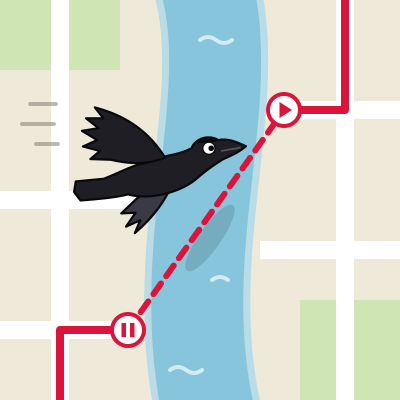
To draw those lines, use the pause-and-resume trick. While you're riding or running:
- Pause your GPS recording.
- Detour to the next point.
- Resume. Your GPS trace will join the two points with a straight line, as if a crow flew between them.
To plan this in RouteDoodle, use Bird Mode. Select the segments, then clicktap the bird button. Bird Mode segments are shown as a dashed line. See Head Out for the other modes.
To Pause or Not to Pause?
Pausing makes it easier to draw a perfect shape, but some artists challenge themselves to pause as little as possible, or not at all.
- Constraints cultivate creativity. In 1975, the pianist Keith Jarrett had to improvise jazz piano at the Cologne opera house on a piano where only half the keys worked well. The performance became the best-selling solo piano recording ever. It was great not despite the constraints, but because of the them.
- Fulfilling challenge. Fitting a drawing to real roads takes both puzzle-solving and artistic skill. Pulling it off without shortcuts is satisfying, and impressive.
- Technological advance. Traditional origami allowed cuts. As folding techniques improved, cuts became unnecessary, and today folded-and-cut paper is called kirigami instead. Likewise, tools like RouteDoodle make it far easier to plan routes that need no pauses.
Neither way is wrong. Think of them as two disciplines, like origami and kirigami.
Tutorials
Short tutorials, right on the map: each one shows you one thing, a step at a time, and waits for you to do each step.
Learn More
More about GPS art and the people who make it. These links leave RouteDoodle.
Read
- GPS drawing on Wikipedia
The history of the form, from the first GPS drawings in the early 2000s. - Runners and Cyclists Use GPS Mapping to Make Art, in the New York Times
A 2022 feature on the Strava art scene. - Strava's 13 favorites
Strava's own pick of the most incredible pieces on the platform.
Browse
- The best cities for GPS art, on the RouteDoodle wiki
Some places are much easier to draw in than others: a dense street grid gives you more lines to work with. - StravArt, a gallery of Strava art
Hundreds of pieces from artists around the world, with their routes.
Watch
- GCN does Strava Art
The Global Cycling Network tries it. - Stephen Lund at TEDx
The Victoria artist behind the pause-plot example on the GPS Art page.
Exporting
Once you're done designing your route doodle, get ready to use it!
- ClickTap the
 Share & Export button, or press ControlE.Open the Share & ExportShare tab at the bottom of the screen, or press ControlE.Open the Share & ExportShare tab at the right edge of the screen, or press ControlE. Export a TCX or GPX file to your computer.Save or share a TCX or GPX file. The TCX format has the best support for turn-by-turn directions (cues).
- Optional: Load the route file into your regular routing app to fine-tune the route.
- Load the route onto your bike computer, smart watch, or phone navigation app.
Roads you ride more than once
Where your route comes into the same corner from the same direction more than once, each direction there says which time around it is, as in “Turn left (2 of 3)”. Where the times around go different ways at that corner, it also says how far along the route you are: “Turn right (second time, at mile 15)”. A corner you pass once each way, as on an out-and-back, needs no number: which way you're heading already says which pass you're on. On a map the passes look like one line, and your app can mix them up, so check the number against the distance your app or bike computer shows. If it says “second time, at mile 15” and your distance reads 12, the app has you on the other pass: take the turn it gives for mile 12.
To leave the numbers out, uncheck Number repeated turns in the settings.
Sharing & Bookmarking
To share a route with someone, or to keep it for later, use a link. Press M to copy one. Tap Share link at the bottom of the Share window.The link carries your whole drawing in the URL, so it reopens the doodle wherever it's pasted. The image isn't included, and the route is rebuilt from current map data.
To show off a doodle on social media, choose Image or Video in the same window.
Saving
Saving to the cloud is not yet implemented. For now, copy a link and bookmark it, or export your drawing as GPX or TCX. You can open a bookmarked link in your browser, or drag or paste it into the RouteDoodle map. You can load a saved GPX/TCX/FIT file by dragging it into the RouteDoodle map.
How to load onto your navigation app
Safety
You are responsible for your own safety. Use your judgment, and don't go anywhere you shouldn't, even if the route does: a road that's too busy for your experience, or anywhere that's closed to the public. If you're new to riding in traffic, move the route onto bike paths and quiet streets before you go.
Check the route before you go
RouteDoodle puts how the route looks first, so it will use paths that weren't designed for bikes. Adjust the route by hand until it's safe and enjoyable as well as beautiful. Look over anything doubtful in the satellite map style, or go and see it in person, to decide whether the route is safe to follow.
Watch the road, not your screen
Pay more attention to the road than to your navigation device. To check your progress on a screen, get off the road first. Better still, use a phone app or GPS device that reads turn-by-turn directions out loud, with bone-conduction headphones so you can still hear traffic.
When the route goes against traffic
In Bike Mode, RouteDoodle avoids — but does not completely prevent — sending you the wrong way down a one-way street, against traffic. Cyclists call this salmoning. If the only way between two points on your route goes against traffic, RouteDoodle takes it, and the directions say "salmon" there. Change the route to avoid it, or get off and walk your bike on the sidewalk for that stretch.
When part of the route turns out impossible
Sometimes there's no safe and beautiful route. Or the map makes it look like there's a good path between two points, but when you get there, that stretch turns out impossible or unsafe. While planning, switch that stretch to Bird Mode, which draws a straight line. On the ride, use the pause-and-resume trick: pause your recording, go around the safe way, and resume where the route picks up again.
Don't risk your life to make art.
Tips
Getting around
- RouteDoodle works on both desktop and mobile.
- On a computer: Open the menu with . to find commands and their shortcuts.
- On a computer: Every shortcut is listed in Keyboard Shortcuts.
- On a phone or tablet: On your phone, RouteDoodle works better once you add it to your home screen.
- Short tutorials show you the Pencil and more, right on the map.
- On a computer: / finds a location on the map.
- On a computer: J brings the map back to your doodle after you’ve wandered away.
Doodle and map styles
- On a computer: Q W E toggle the Image, Drawing, and Route.
- On a computer: Shift+Q Shift+W Shift+E show just one of them.
- On a computer: 0 hides your doodle so you can see the map underneath.
- On a computer: Hold Space for a clean look at the route line alone — what your art will look like on Strava.
- On a computer: 1 through 9 are shortcuts for your favorite map styles.
- On a computer: Drag a map out of the Available Map Styles into Favorite Map Styles to put it on a number key.
Images to trace
- On a computer: F searches the web for images to trace. Simple silhouettes work best.
- Image Search shows each result as the blue line it will become, so you can pick the one that traces cleanest.
- Drag any image onto the map and RouteDoodle traces it into a drawing. Simple silhouettes work best.
- You can drag an image from your desktop or copy-paste an image into RouteDoodle.
- Paste an image’s web address straight into the map to trace it.
- An image saved as SVG keeps its inside lines. Other images are traced around their outline.
- First doodle? Draw a heart. Simple, forgiving, and looks good.
- Drawing an animal? Place the head first. A face is the part nobody will mistake for something else, and the body bends around the roads more easily.
Finding a good area
- Looking for a good place to draw? See the best cities for GPS art.
- Dense street grids give you more to work with. An old city neighborhood beats a suburb with cul-de-sacs.
- On a computer: R paints every routable road on the map, to help you pick a good area to work with.
- Turn on Passable Ground and look for a shaded area big enough for your drawing. Zoom out to scout a whole city.
- On a computer: Rivers and train tracks cut a neighborhood in half — you cross only where there’s a bridge. Train tracks are the sneaky ones; they barely register on the map. Use B to see where neighborhoods are cut.
On a phone or tablet: Rivers and train tracks cut a neighborhood in half — you cross only where there’s a bridge. Train tracks are the sneaky ones; they barely register on the map. Turn on Barriers in Settings to see where neighborhoods are cut. - Not sure you can cut through? Switch to a satellite map style and look.
- On a computer: Shift+G opens Google Maps where you’re looking, so you can check a doubtful path in Street View.
- Show the Roads Layer over a Blank map style and look for shapes that pop out.
- Details disappearing? Try making your doodle larger so there are more streets to work with.
- Looking for where your doodle fits best? The Suggest Spots button searches the map on your screen for spots where the roads line up with it.
- On a computer: Right-drag your doodle around the map to hunt for a spot where the roads cooperate.
On a phone or tablet: Drag your doodle around the map to hunt for a spot where the roads cooperate. - Try rotating your doodle. A small change in angle can make the roads fit much better.
Drawing and editing
- On a computer: P hands you a pencil. Draw straight onto the map and watch the route follow along. Try it: Drawing with the Pencil
- To start a new line, begin drawing well away from the others. While the pencil is on, a dashed line shows where your stroke would join on. Try it: Drawing with the Pencil
- On a computer: O hands you an eraser. Drag across a line to rub part of it out, or click it to cut the line in one spot.
- On a computer: Right after you click a single point, your next pencil stroke always joins on, so you can go from point to point however far apart they are.
On a phone or tablet: Right after you tap a single point, your next pencil stroke always joins on, so you can go from point to point however far apart they are. - Each separate line has its own box. Drag the hand above it to move just that line.
- Need more control over a bend? Drag a hollow marker between two drawing points to add another point.
- On a computer: Shift-click to select a run of points, or Control-click to pick them one at a time.
- On a computer: An animal’s legs or tail don’t fit? Shift-drag to lasso part of the drawing, then move, resize, or rotate the selection to nearby streets.
On a phone or tablet: An animal’s legs or tail don’t fit? Touch and hold, then drag, to lasso part of the drawing, then move, resize, or rotate the selection to nearby streets. - On a computer: Select a point and press DEL or click Remove to delete it. The line stays joined through the points on either side.
On a phone or tablet: Select a point and click Remove to delete it. The line stays joined through the points on either side. - On a computer: X or the Split button cuts a line in two. To join two lines back up, draw with the pencil to connect endpoints, or drag one endpoint onto another. Try it: Working in pieces
On a phone or tablet: The Split button cuts a line in two. To join two lines back up, draw with the pencil to connect endpoints, or drag one endpoint onto another. Try it: Working in pieces - Drag a line’s start onto its end to close it into a loop.
- Ride a stretch there and back and it shows as one line on your GPS track, which is handy for legs, whiskers, and antennae.
- To flip a doodle to its mirror image, resize past the other side.
- On a computer: Points on the red route drag just like points on the blue drawing.
- On a phone or tablet: Doodle moving when you meant to move the map? Turn off One-finger drag moves the doodle in Settings.
- On a computer: Ctrl+Z undoes an edit, so drag things around freely — nothing you try is permanent.
On a phone or tablet: The Undo button undoes an edit, so drag things around freely — nothing you try is permanent. - On a computer: U opens the History: every change you’ve made, with a snapshot of each. Click any of them to go back to that point.
Following the roads
- Going for a run? Switch to Run Mode: it takes footpaths and goes either way on one-way streets.
- Route on busy streets, or drifting off your drawing? The Follow your lines slider in Settings trades nicer roads for a closer fit.
- On a computer: To change the routing mode for part of your doodle, lasso those points and click a mode button. Ctrl+A selects every point.
On a phone or tablet: To change the routing mode for part of your doodle, lasso those points and click a mode button. - A dashed stretch is a Bird Mode straight line. RouteDoodle draws one wherever it can’t find a road between two points.
- Bird Mode draws a straight line between two points — for pause-and-resume, and for the shortcuts the map data doesn’t know about.
- You can ride a bike across a field. Bike Mode won’t route you through one, but Bird Mode will draw the line.
- RouteDoodle will use parking lots and footpaths if they make the drawing work. Check anything odd on a satellite map, or go and look in person.
- Orange-red stretches of the route are the less pleasant ones: a busy street, a rough surface, or a path where you walk your bike.
- On a computer: Wondering why the route took a road? Turn on Road popups in Settings and click that road on the Roads Layer.
On a phone or tablet: Wondering why the route took a road? Turn on Road popups in Settings and tap that road on the Roads Layer. - If the directions say "salmon", that stretch goes against traffic. Change the route, or walk your bike on the sidewalk there.
Stats and directions
- The Comfort score in the stats panel estimates how pleasant the route is to ride.
- The Span in the stats panel shows how many km/mi your doodle is in the real world.
- A GPS art ride takes much longer than an ordinary ride of the same length, because of all the turns. Check the Ride Time in the stats before you go.
- On a computer: Choose which route stats show from the ⋮ beside them.
On a phone or tablet: Choose which route stats show by touching and holding them. - On a computer: Open the elevation chart with V and run your mouse along it to highlight the position on the route.
- On a computer: D opens the turn-by-turn directions.
Saving and exporting
- On a computer: M copies a link to your drawing. Paste it later to load the doodle.
- On a computer: Shift+M opens a copy of your doodle in a new window, so you can try an idea without losing what you have.
- Paste or drag a RouteDoodle link onto the map to open that doodle.
- Drag a route file (TCX, GPX, or FIT) onto the map to load an existing route.
- On a computer: Ctrl+E exports the route as TCX, GPX, or FIT for a bike computer or watch. TCX carries turn-by-turn directions best.
Riding
- When riding, use an app or device that can read turn directions out loud. That helps you avoid missing a turn.
- A stretch turns out to be unsafe? Pause your GPS, go around, and resume. Pause-and-resume draws the straight line for you.
- Want an extra challenge? Ride your entire route without pausing your GPS.
- Made something good? Strava has clubs for Strava art, and Reddit has r/StravaArt.
Map Layers for GPS Art
RouteDoodle has map layers designed for GPS art. They work together, over any map style, or over a Blank one for zero distractions.
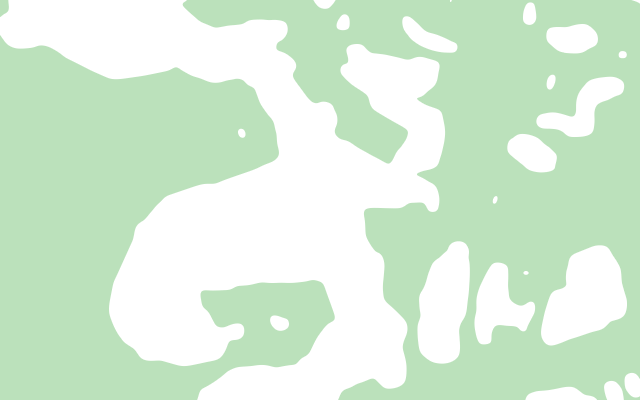
 Passable Ground Press G
Shades in green the ground your route can get across without going far out of its way, and leaves bare what you'd have to go around.
It's the quickest way to find room for a drawing. Look for a shaded area big enough for your drawing, and keep your lines off the bare patches. It looks the same at every zoom, so you can zoom out to scout a whole city.
To choose how far out of the way is too far, set Passable Ground: farthest around in the settings.
 Roads Press R
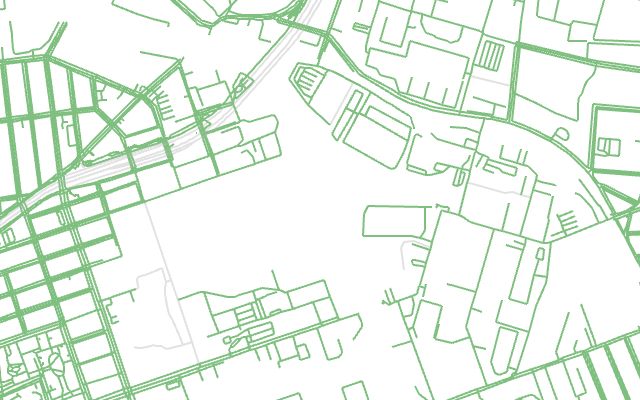
Every road and path you can bike or run on, in green, from cycleways to driveways. Roads you can't use, like freeways, are a faint gray. Arrows mark one-way streets when zoomed in.
One way to make GPS art is to stare at a map and look for shapes that pop out (pareidolia). Driving maps aren't good for this because they hide small roads, and cycling maps aren't good because they show only bike lanes. RouteDoodle's Roads Layer keeps every small road even zoomed out, since they matter as much as the big ones. You can also print it out for sketching on paper.
 Barriers Press B
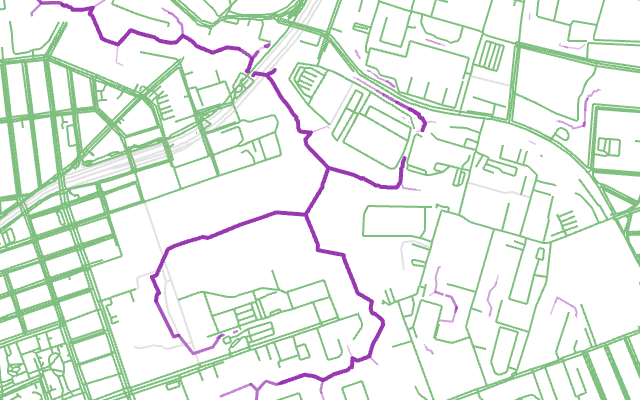
Purple lines through the places the roads don't connect across: a freeway, a railway, a river, a cemetery wall. The stronger the line, the farther you'd have to go to get around it, and a gap in a line is a way across, like a bridge.
Where your drawing crosses a barrier with no way across, the route has to go the long way around, and your art gets a bulge. Move or rotate your doodle so its lines cross at the gaps.
How RouteDoodle picks roads
Most routing apps look for the quickest or most comfortable way there. RouteDoodle looks for the way that best matches your drawing. So it will send you through a parking lot, along a footpath, or up a short flight of stairs if that keeps the line on shape. RouteDoodle prefers easier, safer roads, and takes a harder one only when your drawing needs it.
How Bike Mode and Run Mode differ
| Bike Mode | Run Mode | |
|---|---|---|
| Freeways | Never used. | |
| Private roads | Used only when there's no other way. | |
| Roads with cars | The busier the road, the more it's avoided. Bike lanes and bike paths come first, then quiet streets. | Busy roads with no sidewalk are avoided. Sidewalks and footpaths come first. |
| Rough surfaces | Avoided: gravel, dirt, and anything that isn't smooth pavement. | Avoided: bad surfaces, but less penalizing than on a bike. |
| Footpaths | Avoided, since you'd have to get off and walk. | Preferred. |
| Stairs | Avoided. | Avoided, but less than on a bike. |
| Bike paths | Preferred. | Avoided. |
| One-way streets the wrong way | Used only when needed (“salmoning”). Walk your bike on the sidewalk there. | Fine: one-way streets go both ways on foot. |
Pleasant roads and less pleasant ones
The red Route line changes color where the riding gets worse:
- Pleasant roads.
- Less pleasant ones, like a busy street, a rough surface, a path where you walk your bike, or a one-way street the wrong way.
- A straight line with no road, in Bird Mode or where RouteDoodle found no way through.
Comfort, in the route stats, sums it up: how much of the route is on pleasant roads. 100% is all pleasant, and most routes are between 80% and 100%. The orange-red stretches and straight lines are what bring it down. To raise it, move the Follow your lines slider toward Nicer roads, or move your doodle so its lines run along nicer streets.
Choosing what your route favors
How hard the route works to stay on your lines is up to you. Move the Follow your lines slider in Settings:
- Toward Nicer roads, the route keeps to pleasant roads and lets it drift a block or two off your lines.
- Toward Closer to your lines, the route stays on your lines even when that takes a busier street, many more turns, a path where you walk your bike, or a one-way street the wrong way.
The slider sets the doodle you're editing, and undo takes it back. New doodles start wherever you last set it. A link to your doodle, and a file you download for your bike computer, keep the doodle's setting, so the route comes out the same for whoever opens it.
The route stats show the trade: Match and Average Stray say how close the route keeps to your lines, and Comfort and Turns what that costs.
Why did RouteDoodle pick this road?
To see why your Route used one road and not another, clicktap the road on the Roads Layer. A popup shows what the map knows about that road and how RouteDoodle rates it. To turn on Road popups, check Road popups in Settings.
Route Stats
The route stats are numbers about your doodle: how far it is, how much climbing there is, roughly how long it takes, and more. They're in a small panel in the corner of the map, and change as you edit.
The panel starts with just the Route distance, beside the map style buttons. ClickTap it to open the Stats tab, which has more stats above the elevation chart.
Choosing which stats show
- To choose which stats show, click the ⋮ beside themtouch and hold them, or find them under Route stats in Settings. Check a stat to show it, and uncheck it to hide it.
- Turns and the advanced stats are off until you check them. The advanced ones are under Show advanced stats, at the end of the list.
- In Settings, each stat has three checkboxes: On the map, for the panel on the map; Stats tab; and Full screen, for when you pull the Stats tab up to fill the screen.
- To hide the panel altogether, turn off Route stats in Settings, or press T.uncheck every stat under On the map in Route stats in Settings.
What each stat means
- Drawing
- How long the lines you drew add up to, measured straight along each one from point to point. The roads never run exactly along your lines, so the Route is almost always longer.
- Route
- How far you'll actually ride or run, following the red line along the roads. This is the distance to plan your ride around. If it's much longer than the Drawing, look for places where the roads go a long way around what you drew: moving a point or two often fixes it.
- Span
- How big your doodle is in the real world: the distance between the two points of the route that are farthest apart. The arrow shows which way that distance runs across the map.
- Climbing
- How much uphill there is, with every climb along the route added together and the downhills left out. The elevation chart shows where the climbs are. Also known as Ascent or Elevation Gain.
- Ride Time
- A rough estimate of how long the ride takes from start to finish, including slowing down for turns, stopping at lights and signs, and climbing, but not breaks for coffee or photos. A GPS art ride takes much longer than an ordinary ride of the same distance, because of all the turns. It starts from your Cruising speed, which you can change in Settings. The ~ is a reminder that it's an estimate, and it's rounded: to 5 minutes for a short ride, and to the hour for a long day.
- Turns
- How many turns you make along the route, counting U-turns but not bends in the road. Every turn slows you down and is one more to get right, so fewer turns means a quicker ride that's easier to follow. The directions list every one.
Show advanced statsHide advanced stats
Stats most people never need, for a closer look at the roads the route takes and how closely it follows your drawing.
- Comfort
- How much of the route is on roads and paths that are pleasant to ride, rather than busy or awkward ones. 100% is all pleasant; most routes are between 80% and 100%. Stretches with no road at all, such as Bird Mode, count against it. See How RouteDoodle picks roads for what it avoids.
- Overlap
- How much of the route is on stretches of road you ride more than once, going either way. An out-and-back is 100%; a route that never rides the same road twice is 0%. Ridden twice, a stretch shows as a single line on your GPS track.
- Match
- How much of your drawing the route runs along closely, as a percent. Closely means within 40 m (130 ft), about half a short city block. On a doodle more than 4 km (2.5 mi) across, it's within 1% of the distance across the drawing instead, since a block's difference doesn't show on a map of a doodle that big. A route that is a block off for a stretch scores lower than one that touches your line every block, even though it may look smoother: Match measures closeness, not tidiness. Turns and the Route distance are where tidiness shows. A part of your drawing the route skips altogether counts against Match.
- Average Stray
- How far the route is from your lines, on average, all along the route. The Follow your lines slider in Settings is what changes it: closer to your lines makes it smaller, usually at some cost in Comfort and Turns.
- Worst Stray
- The furthest the route gets from your lines, anywhere along it: its biggest detour. A part of your drawing the route skips altogether doesn't count here, since the route never strayed from it; it counts against Match instead.
- Corners Kept
- How many of your drawing's corners — its points and tips, and the ends of its lines — get a street corner of their own, out of how many it has: 26 of 29, say. When a doodle is small for the blocks under it, corners near each other land on the same street corner, and the route rounds them off into a blob. Match can't tell, since a blob is never far from a drawing that small. If Corners Kept is well short of the total, make your doodle bigger. Gentle curves and points along a straight line aren't corners, so a circle has none.
Add RouteDoodle to Your Home Screen
On a phone, you can put RouteDoodle on your home screen next to your other apps. Tapping its icon opens RouteDoodle full screen, without the browser's address bar and buttons, so the map gets the whole screen. Your phone is also less likely to clear the map data RouteDoodle keeps, so it starts faster. There's nothing to download from an app store.
First, open routedoodle.com in Safari (iPhone) or Chrome (Android). If you got here from a link inside another app, like Instagram or Facebook, that app's built-in browser can't add to the home screen; look for its Open in browser option first.
iPhone
- Tap the Share button . On iOS 26 and later, tap the ••• button beside the address first, then Share.
- Scroll down and tap Add to Home Screen.
- If you see Open as Web App, leave it switched on.
- Tap Add.
On an iPhone, the home screen app keeps its own copy of your work, apart from Safari's, so a doodle you started in Safari won't be there. To bring it over, tap Share link at the bottom of the Share window in Safari, then paste the link into the search box in the home screen app.
Android
- Tap the ⋮ menu button at the top right of Chrome.
- Tap Add to home screen (on some phones it says Install app).
- If Chrome asks whether to install or create a shortcut, choose Install.
- Tap Install or Add to confirm.
RouteDoodle Is 100% Free
All of RouteDoodle is completely free, for everyone, including all pro features: searching for an image, tracing an image, editing your drawing, turn-by-turn directions, and putting your route on your device. No signup is required.
No Catch
There's no paid version, no free trial that runs out, no feature kept back for people who pay, and no ads. No gimmicks. Every tool you see is yours to use, as often as you like.
Why Is It Free?
Karl Chen made RouteDoodle in 2023, when nothing else like it existed, because he needed it to make GPS art of his own. He made RouteDoodle with passion, not to make a buck. RouteDoodle costs very little to run, so it doesn't need to make money to keep going.
What it's for is getting more people out making GPS art. Keeping it free is how it does that.
RouteDoodle vs Other GPS Art Apps
A few other apps also turn a drawing into a route along real roads. Here is how RouteDoodle compares with them. RouteDoodle is 100% free, including all pro features, with no signup, no limits, and no ads, and it has the most tools for adjusting your drawing until the route looks right.
| RouteDoodle | GPSArtify | RouteSketcher | DrawMyLoop | ArtTrails | Motera | TrainCraft | |
|---|---|---|---|---|---|---|---|
| Price | |||||||
| 100% Free | ✓ 100% Free | ✗ $20/year | ✓ $20 lifetime (very limited free demo mode available) | ✓ Free to draw; ✗ €0.33 per automatic placement | ✗ $15/year | ✓ 100% Free | ✓ Free for GPS art; ✗ $100/year for training features |
Everything in RouteDoodle is free, for everyone, including all pro features: tracing an image, editing it, directions, and every kind of file. There's no paid version, no trial that runs out, and no ads. ★ Why it stands out: Some of the others say they're free when they're not actually free. All of the others charge for something you'll need, such as downloading the route, using an image of your own, image packs, suggesting spots -- or they are limited apps without any pro features.
| |||||||
| No ads | ✓ | ✓ | ✓ | ✓ | ✗ | ✓ | ✓ |
| Use it without signing up | ✓ | ✗ | ✗ | ✗ after your first download | ✗ | ✓ | ✓ for GPS art; ✗ for training features |
Open the site and start drawing. There's no account to make and no email address to give. ★ Why it stands out: Most of the others make you sign up first (though some have limited demos before signing up). | |||||||
| Where it runs | |||||||
| On a desktop | ✓ | ✓ | ✓ | ✓ | ✗ | ✓ | ✓ |
RouteDoodle, and the majority of its competitors, work from any desktop web browser. | |||||||
| On a tablet | ✓ | ✓ | ✓ | ✓ | ✓ iPad ✗ Android | ✓ | ✓ |
| On a phone | ✓ | ✓ | ✓ | ✓ | ✓ iPhone ✗ Android | ✓ | ✓ |
RouteDoodle works in your phone's web browser, with nothing to install. You can optionally add it to your home screen and it opens like an app. Add it to your home screen → | |||||||
| Kinds of route | |||||||
| Routes for biking | ✓ | ✓ | ✓ | ✗ | ✓ | ✗ | ✓ |
In Bike Mode, the route goes the right way down one-way streets, and keeps off footpaths, stairs, and roads busy with cars, taking one only when your drawing needs it. ★ Why it stands out: Unlike the other apps, RouteDoodle's routing algorithms were custom made for biking and GPS art. The other apps use off-the-shelf routing algorithms that aren't really made for bike routing and GPS art. Even if they say they have a bike mode, they don't take into account one-way streets or roads better for cyclists. More about how RouteDoodle picks roads → | |||||||
| Routes for running | ✓ | ✓ | ✓ | ✓ | ✓ | ✓ | ✗ |
| Mix both in one route: biking and running segments in one route | ✓ | ✗ | ✗ | ✗ | ✗ | ✗ | ✗ |
| Straight lines between snapped roads, for pause-plot GPS art | ✓ | ✓ | ✓ | ✗ | ✗ | ✗ | ✗ |
Some GPS artists pause their tracker, get to the next point however they can, and resume, so the recording jumps there in a straight line. Bird Mode puts those straight lines in your route, so you can plan them. More about pausing → | |||||||
| Mix both in one route: follow the roads, with the odd straight line where you pause and resume | ✓ | ✗ | ✗ | ✗ | ✗ | ✗ | ✗ |
Pick a mode for each part of the route: follow the roads in Bike or Run Mode, and switch just the stretches where you'll pause to Bird Mode. More about routing modes → | |||||||
| Freehand routes across open ground, like a park or a field, not snapped to roads | ✗ | ✓ | ✓ | ✓ | ✓ | ✗ | ✗ |
| Starting a drawing | |||||||
| Step-by-step tutorials right on the map, to learn as you go | ✓ | ✓ | ✓ | ✓ | ✓ | ✗ | ✗ |
Short tutorials show you one thing at a time, such as drawing with the Pencil, and wait for you to do each step. More about the tutorials → | |||||||
| Ready-made shapes | ✓ | ✓ | ✓ | ✓ | ✓ | ✗ | ✓ |
| Search for any image to trace | ✓ | ✗ | ✗ | ✗ | ✗ | ✗ | ✗ |
Type what you'd like to draw, such as a dragon, and pick an image to trace. ★ Why it stands out: None of the others can search for an image: you have to find one yourself and load it. More about starting from an image → | |||||||
| Make an image with generative AI, for tracing | ✓ | ✗ | ✓ | ✗ | ✗ | ✗ | ✗ |
Type what you'd like to draw, and generate an AI image to trace within the app. ★ Why it stands out: Most of the others can't generate an AI image. You have to do that yourself outside of the app. | |||||||
| Type some words and turn them into a drawing | ✗ | ✗ | ✓ | ✗ | ✗ | ✗ | ✗ |
| Load an image and trace it automatically | ✓ | ✓ | ✓ | ✓ | ✗ | ✗ | ✗ |
Drag in an image (JPEG, PNG, and others) from your computer or another web page, and RouteDoodle traces it into a line. A bold, simple shape on a plain background traces best. ★ Why it stands out: It's free here, for any image. Others charge for it or can't do it. RouteDoodle's tracing algorithm is specially made for finding the best drawing that makes GPS art look good. More about starting from an image → | |||||||
| Load an SVG drawing | ✓ | ✗ | ✗ | ✓ | ✗ | ✗ | ✓ |
A drawing saved as SVG keeps its own lines, inside ones too, rather than being traced around its outline. More about starting from an image → | |||||||
| Trace your own image by hand, drawing over it on the map | ✓ | ✓ | ✓ | ✓ | ✓ | ✗ | ✗ |
| Draw by dragging, like a pencil | ✓ | ✓ | ✓ | ✓ | ✓ | ✗ | ✓ |
| Draw by clicking point by point | ✓ | ✗ | ✓ | ✓ | ✓ | ✓ | ✗ |
| Load a route file from the same app | ✓ | ✗ | ✓ | ✓ | ✗ | ✗ | ✗ |
Paste or drag in a drawing's link from another RouteDoodle session to keep working on it, or a GPX, TCX, or FIT file exported from RouteDoodle. What others lack: Since RouteDoodle keeps the drawing in the link, you can keep track of your RouteDoodle routes however you like. More about saving → | |||||||
| Load a route file from another app (GPX) and make it editable | ✓ | ✗ | ✓ | ✓ | ✗ | ✗ | ✗ |
Drag in a route from another app, such as a GPX, TCX, or FIT file, to edit it. What others lack: Other apps can load a file, but every bend in a curve becomes a waypoint, making it too hard to adjust. More about saving → | |||||||
| Load a route file from another app (TCX/FIT) and make it editable | ✓ | ✗ | ✗ | ✗ | ✗ | ✗ | ✗ |
| Load a ride you or someone already rode/ran (GPX/TCX/FIT) | ✓ | ✗ | ✗ | ✗ | ✗ | ✗ | ✗ |
Drag in a GPX, TCX, or FIT file, to automatically trace it and make it editable. | |||||||
| Placing it on the map | |||||||
| Snap your drawing to the roads | ✓ | ✓ | ✓ | ✓ | ✓ | ✓ | ✓ |
RouteDoodle finds the roads that best follow your drawing, not the quickest way there, so it will take a footpath or cut through a parking lot if that keeps the shape. More about how RouteDoodle picks roads → | |||||||
| Suggest a spot for your drawing, one at a time | ✓ | ✓ | ✗ | ✓ €0.33 per use | ✗ | ✗ | ✓ |
Ask for a better place to put your drawing, wait while the app searches, and it moves your drawing to the one spot it found. | |||||||
| Suggest many spots at once, instantly | ✓ | ✗ | ✗ | ✗ | ✗ | ✗ | ✗ |
Press Suggest Spots and RouteDoodle looks over the part of the map you can see for places where the roads line up with your drawing, trying it a little bigger, smaller, and rotated, and lists the best spots it finds. Click one to move your drawing there. ★ Why it stands out: The others find one spot at a time, and make you wait for it. RouteDoodle comes up with many spots to choose from instantly, and finds new ones as you move around the map. It's free, while others charge as much as €0.33 per use. More about Suggest Spots → | |||||||
| Map layers for finding room for a drawing: Passable Ground, Roads, Barriers | ✓ | ✗ | ✗ | ✗ | ✗ | ✗ | ✗ |
RouteDoodle has three map layers made for GPS art, which work together over any map style. The Passable Ground Layer shades the ground your route can get across, so you can spot an area big enough for your drawing. The Roads Layer shows every road you can bike or run on, small ones included, and grays out freeways, so you can spot shapes in the streets. The Barriers Layer marks the freeways, railways, and rivers your route would have to go around, and the bridges across them, so you can place your lines where they cross. More about the map layers → | |||||||
| Editing | |||||||
| Move the whole drawing | ✓ | ✗ | ✓ | ✓ | ✓ | ✗ | ✗ |
Drag the whole doodle somewhere else on the map to see whether the roads there suit it better. ★ Why it stands out: Finding the right place is most of the work in GPS art. The others can't move a drawing at all or don't do it instantaneously the way RouteDoodle does. More about moving your doodle → | |||||||
| Resize it | ✓ | ✗ | ✓ | ✓ | ✗ | ✗ | ✗ |
Drag a corner to make the doodle bigger or smaller. The route's length updates as you go, so you can stop at a distance you're happy to ride. ★ Why it stands out: Resizing is an important part of finding the right place. The others can't do it or don't do it instantaneously the way RouteDoodle does. More about moving your doodle → | |||||||
| Rotate it | ✓ | ✗ | ✓ | ✓ | ✗ | ✗ | ✗ |
Drag the handle at the top to rotate the doodle until its lines run along the streets. ★ Why it stands out: Rotating is an important part of finding the right place. The others can't do it or don't do it instantaneously the way RouteDoodle does. More about moving your doodle → | |||||||
| Route updates instantly while you draw, move, resize, or rotate | ✓ | ✗ | ✓ | ✗ | ✗ | ✗ | ✗ |
The route along the roads redraws while you drag, so you can watch it change and stop where it looks best. ★ Why it stands out: None of the others do this, so finding a good place there takes many tries. | |||||||
| Handles big doodles, with hundreds of points, without slowing down | ✓ | ✗ | ✗ | ✗ | ✗ | ✗ | ✗ |
A detailed drawing, or one that spans a whole city, stays quick to move, resize, and edit. ★ Why it stands out: Others, such as RouteSketcher, slow down or crash the browser on a big doodle. | |||||||
| Drag the drawing's points one at a time | ✓ | ✗ | ✓ | ✓ | ✓ | ✗ | ✗ |
| Route updates instantly while you drag points | ✓ | ✗ | ✓ | ✗ | ✗ | ✗ | ✗ |
| Move, resize, and rotate part of the drawing | ✓ | ✗ | ✗ | ✗ | ✗ | ✗ | ✗ |
Select some of the points and an amber box appears around them: drag its handles to move, resize, or rotate just that part, such as an arm or a tail. ★ Why it stands out: None of the others can, so there you'd move each point by hand. More about editing your doodle → | |||||||
| Rub out part of the drawing with an eraser | ✓ | ✗ | ✗ | ✗ | ✗ | ✗ | ✗ |
Turn on the Eraser and drag across the drawing to rub out part of it, as you would on paper. The route follows what's left while you erase. ★ Why it stands out: None of the others have an eraser. There, to rub out part of a long line, you'd add a point where it should stop, then remove the points beyond it one at a time. More about editing your doodle → | |||||||
| Cut a drawing into pieces and join them back up | ✓ | ✗ | ✗ | ✗ | ✗ | ✗ | ✗ |
Cut the drawing into separate lines to move or reshape one part on its own, then join them back into one line to ride. More about editing your doodle → | |||||||
| Undo and redo | ✓ | ✗ | ✓ | ✓ | ✓ | ✗ | ✗ |
| Visual undo history | ✓ | ✗ | ✗ | ✗ | ✗ | ✗ | ✗ |
| Routing features | |||||||
| Adjust how the route picks roads | ✓ | ✗ | ✗ | ✗ | ✗ | ✗ | ✗ |
Move the Follow your lines slider in Settings to say what matters more to you: keeping to pleasant, quiet roads even if the route drifts a block off your lines, or staying right on your lines even when that takes a busier street or more turns. The route redraws as you move it. RouteDoodle's routing is its own, made for GPS art, so you can adjust how it chooses roads. The others use off-the-shelf routing algorithms with fixed rules, so the route you get is the route you get. More about how RouteDoodle picks roads → | |||||||
| Turn-by-turn directions, to review steps and calculate time | ✓ | ✗ | ✗ | ✗ | ✗ | ✗ | ✗ |
See every turn of the route before you set out. ★ Why it stands out: None of the others can generate directions. RouteDoodle uses a custom algorithm for directions made specially for for GPS art. More about the Route → | |||||||
| Directions that stay clear where the route repeats a road | ✓ | ✗ | ✗ | ✗ | ✗ | ✗ | ✗ |
Where the route comes into the same corner the same way more than once, each direction there says which time around it is, as in “Turn left (2 of 3)” or “Turn right (second time, at mile 15)”, so you can tell which pass you're on, and notice when your app has you on the wrong one. ★ Why it stands out: None of the others have directions at all. The route builders in RideWithGPS, Strava, Komoot, and Garmin are made for getting from one place to another and don't expect a route to cross itself, so following a drawing with them means getting confused at every road the route repeats. More about directions in your file → | |||||||
| Estimated time | ✓ | ✗ | ✗ | ✗ | ✗ | ✗ | ✓ |
See how long the route takes. Of the others, only TrainCraft estimates it. RouteDoodle uses a custom algorithm made specially for GPS art that takes into account elevation gain and the fact that turns slow you down a lot, especially when you want to avoid missing a turn that would mess up your GPS trace. | |||||||
| Elevation profile, to see the hills | ✓ | ✗ | ✗ | ✓ | ✗ | ✗ | ✓ |
| Slide along the elevation profile and see each spot on the map | ✓ | ✗ | ✗ | ✗ | ✗ | ✗ | ✗ |
| Exporting and sharing | |||||||
| Turn-by-turn directions in the file, spoken aloud by RideWithGPS, and shown on bike computers | ✓ | ✗ | ✗ | ✗ | ✗ | ✗ | ✗ |
Export a TCX or FIT file, and your bike computer or RideWithGPS tells you about each turn as you ride. ★ Why it stands out: None of the others put directions in their files, so with them you follow a line on a screen. More about exporting → | |||||||
| GPX file, for most apps and devices | ✓ | ✓ | ✓ | ✓ | ✓ | ✓ | ✓ |
| TCX file, for RideWithGPS and Garmin, with directions | ✓ | ✗ | ✗ | ✗ | ✗ | ✗ | ✗ |
| FIT file, for bike computers and watches, with directions | ✓ | ✗ | ✗ | ✗ | ✗ | ✗ | ✗ |
| KML file, for Google Earth | ✓ | ✗ | ✗ | ✗ | ✗ | ✗ | ✗ |
| Spreadsheet with turn-by-turn directions (CSV file) | ✓ | ✗ | ✗ | ✗ | ✗ | ✗ | ✗ |
| Image of your route without map background | ✓ | ✗ | ✓ | ✗ | ✗ | ✗ | ✗ |
| Image of your route with map background | ✓ | ✗ | ✗ | ✗ | ✗ | ✗ | ✗ |
| Video of your route | ✓ | ✓ | ✓ | ✗ | ✗ | ✗ | ✗ |
| Save your drawings on your device, to come back to later | ✓ | ✗ | ✗ | ✓ | ✗ | ✗ | ✗ |
Copy the link to your drawing and bookmark it, or keep it wherever you like. Open it, or paste or drag it into the map, to pick up where you left off. The image isn't included. More about saving → | |||||||
| Save your drawings to an account, to open on any device | ✗ | ✗ | ✓ | ✓ | ✗ | ✗ | ✗ |
| Share an unpublished link to your drawing, ready for others to edit and download | ✓ | ✗ | ✗ | ✗ | ✗ | ✗ | ✗ |
Copy a link that opens your doodle for anyone, ready to change and export. The image isn't included. More about sharing → | |||||||
| Publish to a public gallery | ✗ | ✗ | ✓ | ✓ | ✗ | ✗ | ✗ |
Strava, RideWithGPS, Komoot, and Garmin
These aren't really alternatives to RouteDoodle; you'll want them too. RouteDoodle makes the route, and they take it from there.
What they're good for: following your route, with turn-by-turn directions on your phone, watch, or bike computer; recording your activity; and showing off the finished art to your friends. See Exporting for how to load a RouteDoodle route into each of them.
What they're not good for: designing GPS art. Their route builders are made for getting from one place to another, so a drawing has to be built up one click at a time. They can't trace an image, and once a route is created, there's no way to move, resize, or rotate the whole thing to see whether it would fit better a few blocks over, and there's no way to find spots that would fit the drawing better. Their directions don't expect a route to cross itself either, so where a drawing rides the same road twice they leave you guessing which way to go at each corner you pass again.
Keyboard Shortcuts
| ← → ↑ ↓ | Move map | Shift← → ↑ ↓ | Move map x3 |
| + - | Zoom map | Shift+ - | Zoom map x3 |
| Q | Show/hide Image | ShiftQ | Show only Image |
| W | Show/hide Drawing | ShiftW | Show only Drawing |
| E | Show/hide Route | ShiftE | Show only Route |
| R | Show/hide Roads | ||
| G | Show/hide Passable Ground | B | Show/hide Barriers |
| J | Jump to off-screen doodle or search result | ||
| A | Show/hide Doodle | ShiftA | Show doodle, and center map |
| 0 | Hide/show Doodle | Shift0 | Hide doodle |
| D | Show/hide Directions (Cuesheet) | ShiftL | Show/hide my location |
| V | Show/hide Elevation Chart | ||
| 1234 | Change map style | ||
| P | Pencil tool | O | Eraser tool |
| Backspace | Remove selected points | ControlA | Select all |
| X | Split line at selected point | ||
| Z or ControlZ | Undo | Y or ControlY | Redo |
| U | Show/hide History | S | Show/hide Spots |
| . | Show/hide menu | , | Show all settings |
| H | Show/hide help | H,K | Show keyboard shortcuts |
| H,T | Take a tutorial | ||
| F or ' | Image Search | / | Search map |
| M | Copy link to clipboard | ShiftM | Open link in new window |
| ControlE | Open the Share & Export window | ShiftControlE | Export, using previous settings |
| AltShiftO | Open OpenStreetMap editor | ||
| ShiftG | Open Google Maps |
Privacy Policy
Last updated: October 18, 2026
This Privacy Policy describes RouteDoodle, LLC's policies and procedures on the collection, use, and disclosure of your information when you use the RouteDoodle Services, as that term is defined in our Terms and Conditions.
By using the RouteDoodle Services, you agree to the collection and use of information in accordance with this Privacy Policy.
RouteDoodle, LLC does not sell, and has not sold, your personal information.
Vendors
RouteDoodle, LLC uses certain vendors, who may transmit information to or from RouteDoodle.
| Cloud Vendors | RouteDoodle uses cloud service providers such as Amazon Web Services and CloudFlare (collectively, "Cloud Vendors") to provide core functionality. RouteDoodle, LLC and the Cloud Vendors collect and record web server usage data, including your IP address and location information, device information, and the list of web addresses queried. |
|---|---|
| Map Vendors | RouteDoodle accesses map-related information from map servers such as OpenStreetMap, mirrors, basemap vendor servers, geocoding servers, their cloud service providers, content delivery networks, and other vendors and service providers (collectively, "Map Vendors"). The Map Vendors may collect and record your IP address and location information. |
| Analytics Vendors | RouteDoodle may use third-party analytics and observability service providers such as Google Analytics, Sentry, or PostHog (collectively, "Analytics Vendors") in order to provide better services. These Analytics Vendors may use cookies or other similar technology, and may collect and record your IP address and location information, device information, content viewed or interacted with, user interactions such as mouse clicks, and browser event data. |
Location Information
Location Information that RouteDoodle, LLC and vendors may collect includes the following:
| Device Location | Your location according to your device (if you opt-in) |
|---|---|
| IP Location | Your location according to your IP address |
| Map Location | The location you are viewing on the map |
| Map Search Location | The location you searched for on the map |
| Drawing Location | The location of the drawing and route you placed on the map |
Creating an Account and Logging In
It is not necessary to create an account or log in, to productively use RouteDoodle.
If you choose to create an account, RouteDoodle stores the email address you give, your password in a hashed form that cannot be turned back into the password, which version of the Terms and Conditions you agreed to, your settings, and, for each device you sign in from, its network address and browser type, used to limit misuse and to list where you are signed in. Nothing else. Account email — a confirmation link, a password reset — goes only to the address on the account. Deleting your account, in Settings, removes all of it.
If you do not log in, RouteDoodle does not collect your username or email address. RouteDoodle only stores a random identifier in your browser so that we can tell one visit from another when diagnosing problems. It is not linked to your name or to anything that identifies you.
Cookies
RouteDoodle employs cookies and browser local storage technology to provide better services. This includes but is not limited to staying logged in, saving your image/drawing/route, and caching Input Map Data.
Changes to Privacy Policy
RouteDoodle reserves the right to modify this Privacy Policy from time to time. Please review it occasionally. Any changes will become effective upon posting of the revised Privacy Policy on the RouteDoodle website. If we make changes we deem to be material, we will notify you when you log in. If you object to any changes to this Privacy Policy, you should stop using RouteDoodle and delete your account.
Contact
If you have any concerns regarding this Privacy Policy, please send email to info@RouteDoodle.com.
Terms and Conditions
Last updated: October 18, 2026
We are RouteDoodle, LLC ("we", "us", "our"). We operate the website RouteDoodle.com, as well as any other related products and services (collectively, the "RouteDoodle Services"). You may contact us by email at info@RouteDoodle.com.
By using the RouteDoodle Services, you agree to the following terms and conditions ("Terms"). If you do not agree with any part of these Terms, then you may not use the RouteDoodle Services.
Our Privacy Policy describes how we collect, use, and disclose your information, and is incorporated into these Terms by reference. By using the RouteDoodle Services, you also agree to the Privacy Policy.
Eligibility
You must be at least 18 years old and have the legal authority to enter into these Terms, in order to use the RouteDoodle Services.
Description of Services and Methodology
The goal of the RouteDoodle Services is to help you create GPS Art by suggesting navigational routes that resemble a drawing. The routes can be used for cycling, running, or other physical movement activities ("Physical Activities"). The RouteDoodle Services use automated algorithms, heuristics, code, rules, database lookups, caching, and other software techniques (collectively, "Algorithms"). The function of the Algorithms includes, but is not limited to, selecting geographic waypoints on a map, finding navigable paths between each waypoint, and suggesting turn-by-turn directions for navigation.
The Algorithms rely on map-related data from OpenStreetMap and other vendors ("Input Map Data"), including but not limited to information relating to roads, sidewalks, highways, and other ways, including but not limited to attributes such as geographic coordinates, elevation, names, connectivity, access restrictions, and quality of road surface.
The Algorithms generate "Routing Output", which includes but is not limited to any routes, information, file, turn-by-turn directions, cues, instructions, text data, binary data, geographic data, or other data produced by the RouteDoodle Services that can be used for making GPS art or for navigation, including but not limited to location of control points, waypoints, wireframe, drawing, paths between points, and turn-by-turn directions; for clarity, Routing Output includes but is not limited to files downloaded as GPX, TCX, FIT, KML, CSV, SVG, PNG, or other format, and includes but is not limited to information retrieved, exported, captured, or printed from the RouteDoodle Services, even if it is done without using formal download functionality.
Disclaimer of Warranty
THE ROUTEDOODLE SERVICES ARE PROVIDED "AS-IS" AND "AS-AVAILABLE" AND COME WITH NO WARRANTY, EXPRESS OR IMPLIED, INCLUDING BUT NOT LIMITED TO THE WARRANTIES OF MERCHANTABILITY, FITNESS FOR A PARTICULAR PURPOSE, TITLE, AND NONINFRINGEMENT.
You acknowledge that the Input Map Data used by the RouteDoodle Services are made of freely available and publicly editable user-generated content. You acknowledge that Input Map Data and Routing Output may differ from actual conditions, and may be incomplete or erroneous. You acknowledge that RouteDoodle, LLC is not involved in validating, correcting, completing, improving, accepting feedback, monitoring, or overseeing Input Map Data. You acknowledge that the RouteDoodle Services may use an out-of-date or incorrect version of Input Map Data, due to caching, planned and unplanned downtime, bugs, or other reasons.
You acknowledge that the RouteDoodle Services (for reasons including but not limited to the methodology described in these Terms) may produce Routing Output that is not as practical, safe, or legal compared to what would be produced by conventional routing services that make routes for utility travel or enjoyment of the trip. You acknowledge that the RouteDoodle Services may generate Routing Output that may have dangerous conditions, may be illegal to traverse, and may be unsuitable for Physical Activities, due to errors and omissions in the Input Map Data, known or unknown flaws in the Algorithms, or other reasons. You acknowledge that RouteDoodle, LLC does not guarantee that any portion of Routing Output generated by the RouteDoodle Services is safe, legal to traverse, practical, appropriate, or better than alternatives in any way.
You acknowledge that RouteDoodle, LLC does not guarantee that the RouteDoodle Services are free of bugs, malware, or other defects. You acknowledge that RouteDoodle, LLC does not guarantee that any errors will be corrected.
Assumption of Risk
You acknowledge that Routing Output is not intended or expected to be used without your careful review and manual adjustment. You agree that it is your responsibility to ensure safety and legality, including but not limited to adjusting the Routing Output manually after it is automatically generated, and being careful and complying with laws and regulations while using Routing Output during Physical Activities. You voluntarily assume all known and unknown risks related to using the RouteDoodle Services, even if they are caused by negligence of RouteDoodle, LLC, its parents, subsidiaries, affiliates, shareholders, LLC members, directors, officers, employees, agents, partners, suppliers, and licensors (collectively, the "RouteDoodle Parties").
You acknowledge that the Physical Activities in which you may participate in conjunction with the RouteDoodle Services are inherently risky, including but not limited to when making GPS art. You acknowledge that using a route created by automated software based on user-contributed map data is inherently risky. You acknowledge that looking at a device or screen during Physical Activities is inherently risky. You agree that you are solely responsible for whether to wear a helmet or other protective gear or equipment. You agree that it is your responsibility to follow all applicable laws and regulations, regardless of Routing Output. For the avoidance of doubt, you agree that it is your responsibility to be safe and follow applicable laws and regulations, even if the Routing Output includes navigational steps that go onto non-public roads or against the flow of traffic, regardless of whether or not the Routing Output indicates this with words like "dismount" or "salmon". You agree that RouteDoodle, LLC is not an event organizer or race course organizer. You agree that RouteDoodle, LLC does not assume responsibility for inspection, supervision, preparation, or conduct of any Routing Output or Physical Activities and does not have a duty of care for ensuring the safety or legality of Routing Output or Physical Activities.
Limitation of Liability
To the maximum extent permitted by law, under no circumstances and under no legal or equitable theory, whether in tort, contract, strict liability, negligence, or otherwise, shall the RouteDoodle Parties be liable to you or to any other person for any indirect, special, incidental, consequential, punitive, or exemplary losses or damages of any nature arising out of or in connection with the use of or inability to use the RouteDoodle Services, including but not limited to property damage, bodily injury, death, lost profits, lost time, loss of goodwill, loss of data, accuracy of results, or computer failure or malfunction, even if the RouteDoodle Parties have been advised of or should have known of the possibility of such losses or damages.
In no event will the RouteDoodle Parties be liable for any damages in excess of the fees, if any, paid by you to RouteDoodle, LLC in connection with your use of the RouteDoodle Services during the twelve month period preceding the date on which the claim arose (or up to $10.00 if you have not paid for RouteDoodle Services during this period).
You acknowledge that the disclaimer of warranty, allocation of risk, and limitations of damages are material and fundamental elements of the basis of the bargain between RouteDoodle, LLC and you; you acknowledge that RouteDoodle, LLC would not provide the RouteDoodle Services without such terms; and you agree that they are fair and reasonable. You agree that the limitations of liability and exclusion of damages will apply even if this remedy doesn't fully compensate you for any losses or if any remedy fails of its essential purpose.
Indemnification
You (and any third party on whose behalf you use the RouteDoodle Services) agree to defend, indemnify, and hold harmless the RouteDoodle Parties from and against all claims, actions, demands, obligations, losses, liabilities, costs or debt, and expenses, including but not limited to attorneys' fees and accounting fees, arising out of your use of the RouteDoodle Services or Routing Output, including but not limited to your breach of any applicable law or infringement of the rights of a third party, even if it involves property damage, bodily injury, or death. RouteDoodle, LLC reserves the right, at its own cost, to assume the exclusive defense and control of any matter otherwise subject to indemnification by you, in which event you will fully cooperate with RouteDoodle, LLC in asserting any available defenses. You may not settle or negotiate any claim that results in liability to, or imposes any obligation upon the RouteDoodle Parties, financial or otherwise, without the written consent of RouteDoodle, LLC.
Choice of Law and Venue
The validity, interpretation, construction, and performance of this agreement shall be governed by the laws of the State of New York, without regard to its conflict of laws principles. You agree that all actions or proceedings arising in connection with this agreement shall be tried and litigated only in the state and federal courts located in the County of New York, State of New York.
Nothing in this section prevents either you or RouteDoodle, LLC from bringing an individual claim in small claims court, in the jurisdiction where you reside, if the claim qualifies for that court. These Terms are still governed by the laws of the State of New York.
Time Limitation on Claims
You agree that any claim you may have arising out of or related to your relationship with the RouteDoodle Services or RouteDoodle, LLC and these Terms must be filed within one year after such claim arose; otherwise, your claim is permanently barred.
Exclusion and Limitations
Some jurisdictions do not allow the exclusion of certain warranties, the limitation or exclusion of liability for incidental or consequential damages, the release or assumption of risk of liability for personal injury, or time limitation on claims. Therefore, some of the disclaimers, assumption of risk, limitation of liability, or time limitation on claims may not apply to you.
Severability
If any provision of these Terms is held unenforceable or invalid, such provision will be changed and interpreted to accomplish the objectives of such provision to the greatest extent possible under applicable law and the remaining provisions will continue in full force and effect.
Waiver
A waiver by either party of any term or condition of these Terms or any breach thereof, in any one instance, will not waive such term or condition or any subsequent breach thereof.
Interpretation
The section headings in these Terms are provided merely for convenience and shall not be given any legal import.
Entire Agreement
These Terms, together with the Privacy Policy, constitute the entire agreement between you and RouteDoodle, LLC, and shall govern use of the RouteDoodle Services, superseding any prior version of these Terms and superseding any prior or contemporaneous oral or written communication.
No Third Party Rights
Unless expressly stated in these Terms to the contrary, nothing herein is intended to confer any rights or remedies on any persons other than you, RouteDoodle, LLC, and our successors and assigns. Nothing in these Terms is intended to relieve or discharge the obligation or liability of any third persons to you and RouteDoodle, LLC and our successors and assigns, nor shall any provision give any third parties any right of subrogation or action over against you, RouteDoodle, LLC, and our successors and assigns.
Force Majeure
Neither party shall be liable for any delay or failure to perform resulting from causes outside its reasonable control, including, but not limited to, acts of God, war, terrorism, riots, embargos, acts of civil or military authorities, fire, floods, accidents, strikes, or shortages of transportation facilities, fuel, energy, labor or materials.
Revisions
We reserve the right, at our sole discretion, to modify or replace these Terms at any time. The Last-Updated date in these Terms will be updated to provide notice of changes, and such posting on the website shall be deemed constructive notice. If the Terms change, the website will prompt you to accept the new Terms before allowing you to download a route file; nevertheless, regardless of whether you use the download functionality or have re-clicked the button to agree to the terms, by continuing to use the RouteDoodle Services, you agree to the revised Terms.
Property Rights
The map data is copyright OpenStreetMap and its contributors, licensed under the Open Data Commons Open Database License (ODbL)
We own the copyright to the RouteDoodle logo. You may not use or display it without our prior written permission, other than the following specific use. The RouteDoodle Services include functionality to let you download an image of your route that includes the RouteDoodle logo. You may reproduce and share this image including the RouteDoodle logo, provided that you do not use this to convey or imply that RouteDoodle, LLC endorses or approves the content of your image.
We reserve all rights not expressly granted hereunder.
Your Feedback
We welcome your comments, feedback, suggestions, and other communications (collectively, "Feedback"). If you provide Feedback, you hereby grant RouteDoodle, LLC a worldwide, non-exclusive, transferable, assignable, sub-licensable, perpetual, irrevocable, royalty-free license to copy, distribute, create derivative works of, publicly display and perform and otherwise exploit such Feedback and to use, make, have made, sell, offer for sale, import and export products and services based on such Feedback.
External Links
The RouteDoodle Services contain links to third-party websites. These links are provided as a convenience and for informational purposes only. They do not constitute an endorsement or approval by us of any products, services, or opinions. RouteDoodle, LLC bears no responsibility for the accuracy, legality, or content of the external site or subsequent links.
Termination
RouteDoodle, LLC has the right to, immediately and without notice, suspend or terminate any services provided to you, for any reason, or no reason at all. You agree that all terminations shall be made in our sole discretion and that RouteDoodle, LLC shall not be liable to you or any third party for any termination.
All provisions of the Terms which by their nature should survive, shall survive these Terms and your use of the RouteDoodle Services, including but not limited to ownership provisions, indemnification obligations, warranty disclaimers, limitation of liability, and time limitation on claims.
Feedback
Love RouteDoodle, have suggestions, found a bug? Submit feedback or email info@RouteDoodle.com.
Who's behind RouteDoodle?
RouteDoodle was made by Karl Chen. Check out Karl Chen's GPS Art.